Elasticsearch
Go to Setup from the main menu and click on the Elasticsearch tab.
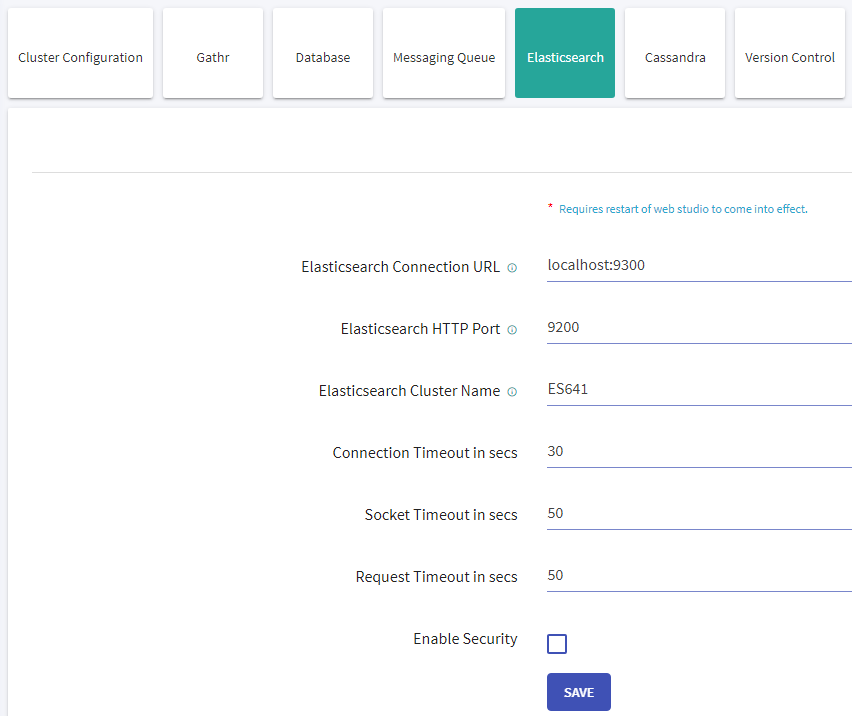
Provide values for the following properties:
| Field | Description |
|---|---|
| Elasticsearch Connection URL | Provide Elasticsearch connection URL as below: <es_host>:<es_connetion_port> |
| Elasticsearch HTTP Port | Provide http port |
| Elasticsearch Cluster Name | Provide cluster name |
| Enable Security | Provide RabbitMQ login password. |
| Enable Security | If security is enabled on Elasticsearch set this to true. |
| Enable Authentication | If Authentication is enabled on Elasticsearch check the check box |
| Enable SSL | If SSL is enabled check the checkbox |
| Keystore Password | Elasticsearch Keystore password |
If you have any feedback on Gathr documentation, please email us!